Spend the expensive model on planning, the cheap one on doing
In one AI job, the hard part is deciding; the easy part is executing. Burning an expensive model for everything often wastes money. The thrifty pattern: strong models understand and decide; cheap models do the work.
Strong models feel great—until usage hits. Quotas vanish, or the bill climbs without a pause.

So how do you keep quality while slowing the burn?
Spend where things are uncertain; run volume where they’re clear
To save money, know what you can save.
Look at an AI job: there are really two kinds of work:
- What do you want, what’s the goal, where are the edges, what comes first, which option is worth it.
- Now that it’s clear, just do it.
Like hiring an outsourced team: aligning requirements and acceptance criteria up front is the highest-leverage spend.
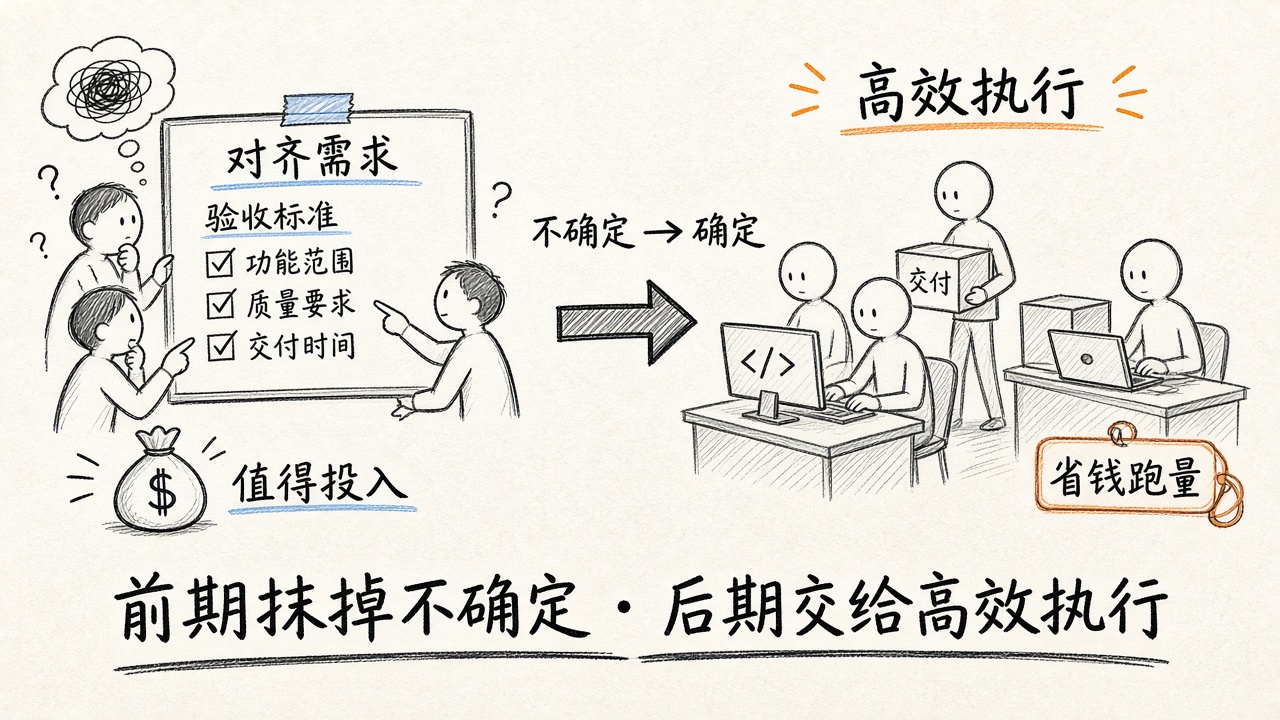
Without that alignment, the build drifts, then rework eats the savings.
So the more you turn uncertainty into a plan early, the smoother execution gets later.
Same with AI. Spend a bit to erase uncertainty; for execution, pick an efficient worker. Results stop drifting as often.
How to make AI follow that pattern
I use AI every day and tried a few shapes. Two paths stick.
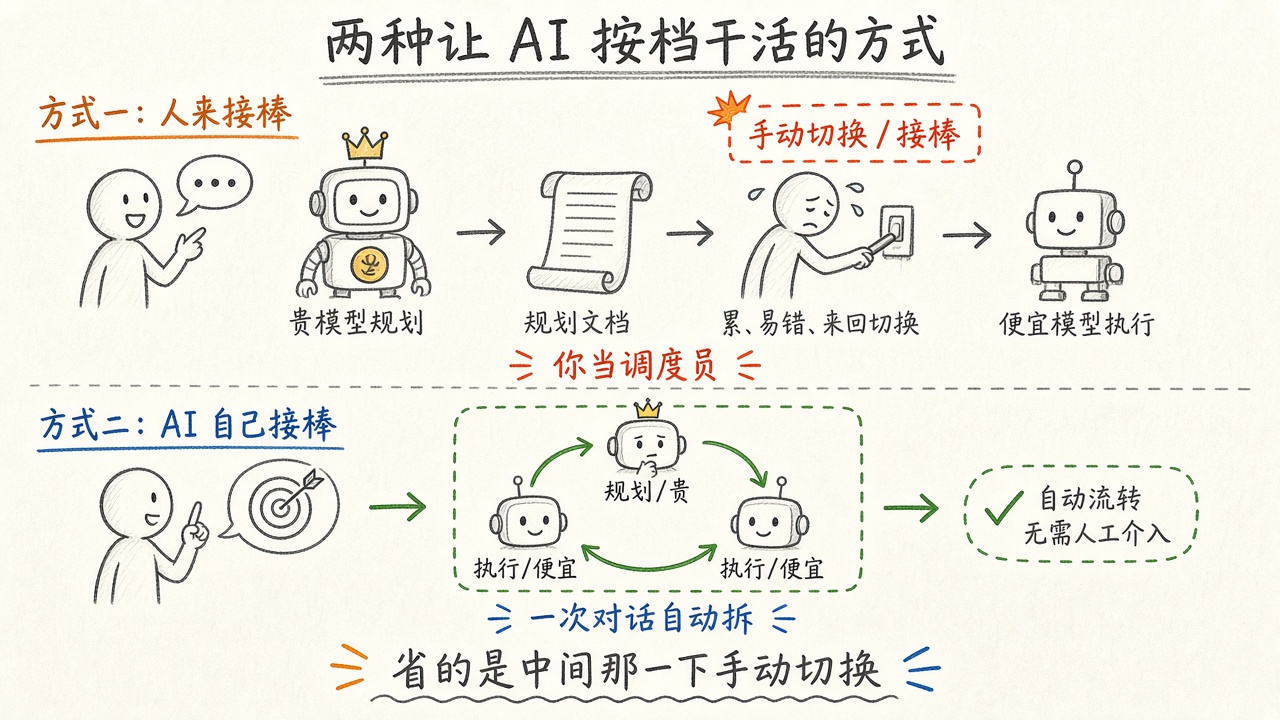
Path one: you split, you hand off.
Most people do this.
- Pick a model, clarify the goal, get a plan doc.
- Treat that as the handoff (or stay in the same thread), switch to a cheaper model, and execute from the doc.
It works—but the manual switch costs your attention. You’re more tired than the models.
Path two: several AI identities that hand off themselves.
Put roles in the app—PM, engineering, testing—each with a model tier: decision seats expensive, execution seats cheap. Then:
- Tell the PM what you need.
- The PM finds engineering to build it.
- Testing checks the artifact.
More on multi-role benefits: How I use multi-agent collaboration.
Path one is fine for occasional savings. Path two feels like normal work: you state the goal; the team hands off inside.
Path two inside AgentUp
I built that into AgentUp.
AgentUp treats AIs like contacts: each assistant has identity, folder, and skills. Hard work becomes a group—someone decides, someone takes tickets. That shape already fits a planning seat and an execution seat.
Models have two modes:
- Shared for all: one model for the group, less fiddling.
- Per agent: each Agent gets a fitting model for cost control.
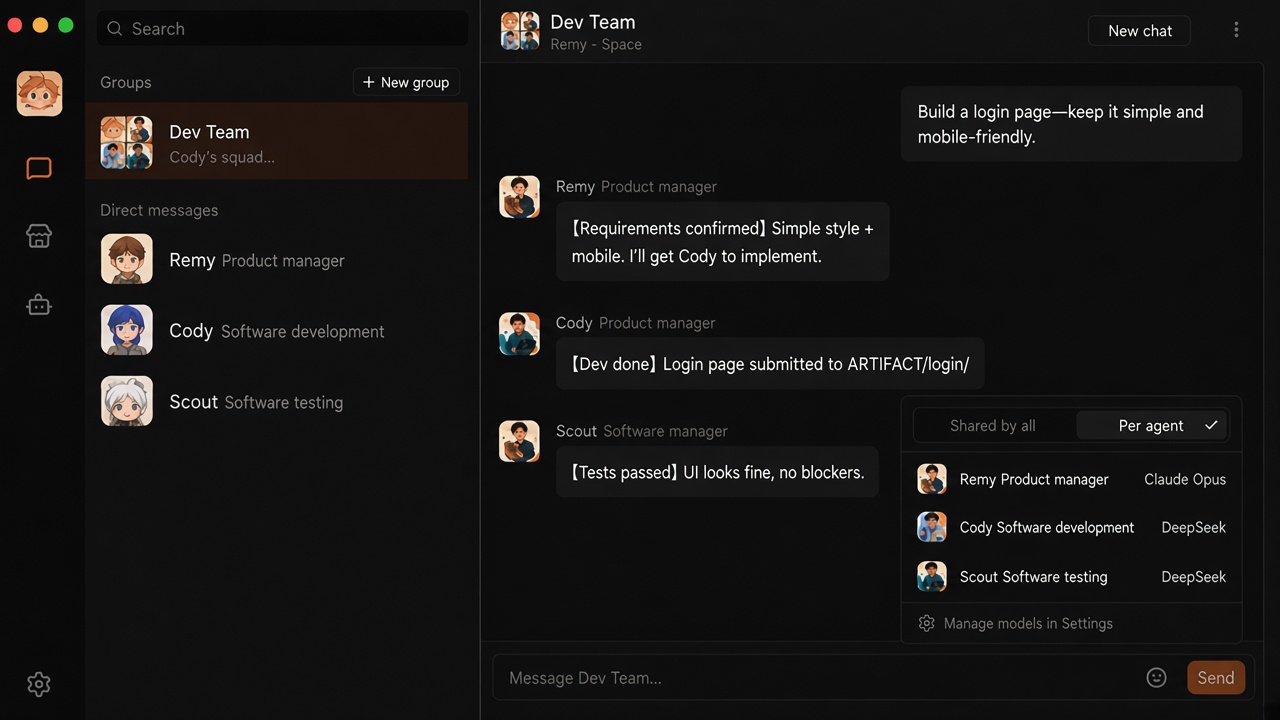
On per-agent, the menu shows who uses what. Decision roles get stronger tiers; volume roles get cheaper ones. Click someone to change their DM model config.
Day to day stays the same: join the group, say one goal. The decision-maker plans on a strong tier; executors take tickets on cheaper ones. You don’t finish on a premium model, then paste into a cheap one.
AgentUp is open source on GitHub:
https://github.com/MorvanZhou/agentup
Site:
FAQ
- My AI bill is high, but I don’t want worse results. What helps?
- Don’t run top-tier end to end, and don’t hand-switch models by stage. In one conversation, let the expensive model only plan and split; once the work is clear, cheaper models execute. Quality hangs on that early judgment; the bulk run shouldn’t burn at top-tier rates.
- Do I have to run planning and execution as two manual steps?
- No. Ideal flow: you state one goal; the lead agent plans and splits on the strong model; executors pick up on cheaper ones. The split happens inside one collaborative chat—not “finish on a strong model, then paste into a cheap one.”
- Why does multi-agent group chat fit cost tiers?
- Groups already have a lead and people who take tickets. You drop a goal; the lead thinks and assigns on a strong tier; executors run volume on cheaper tiers. Tiers follow people—more natural than one window at one tier, or you switching models yourself.
- How does AgentUp let agents use different models?
- In the group model menu, pick shared-for-all or per-agent. For cost control, use per-agent: strong tier on the lead, cheap tiers on executors. You still drop one goal; who runs which model rides with the role.
Try AgentUp on your computer
Download the desktop app, add specialists to your contacts, and team up when the ask spans topics.
Download